关于使用Intel AI PC为YOLO模型训练加速的问题补充
首先感谢这位大佬写的这篇文章,为使用英特尔GPU进行训练的我提供了帮助使用Intel AI PC为YOLO模型训练加速_intel显卡 训练 yolo-CSDN博客文章浏览阅读2.8k次,点赞29次,收藏22次。本文围绕深度学习模型训练效率提升与硬件资源优化利用这一核心主题,聚焦于英特尔AI PC系列平台,深入阐述了从传统 CPU 训练模式向 XPU 赋能训练模式的转型历程,尤其以 YOLO 模型训练作为典型范例展开剖析。_intel显卡 训练 yolohttps://blog.csdn.net/inteldevzone/article/details/144266941
我相信很多同学或者初学者都使用这轻薄本等只有集成显卡的电脑,受限于集成显卡的限制,很多初学者会使用CPU进行训练,CPU只能单线程处理训练任务,使得训练速度十分的慢,现在可以通过教程,来使用英特尔的集成GPU进行训练,在我的电脑上速度大概快了4倍左右, 但在部署时碰到了很多问题,接下来我将对这些问题进行解答。
训练调用GPU的图片
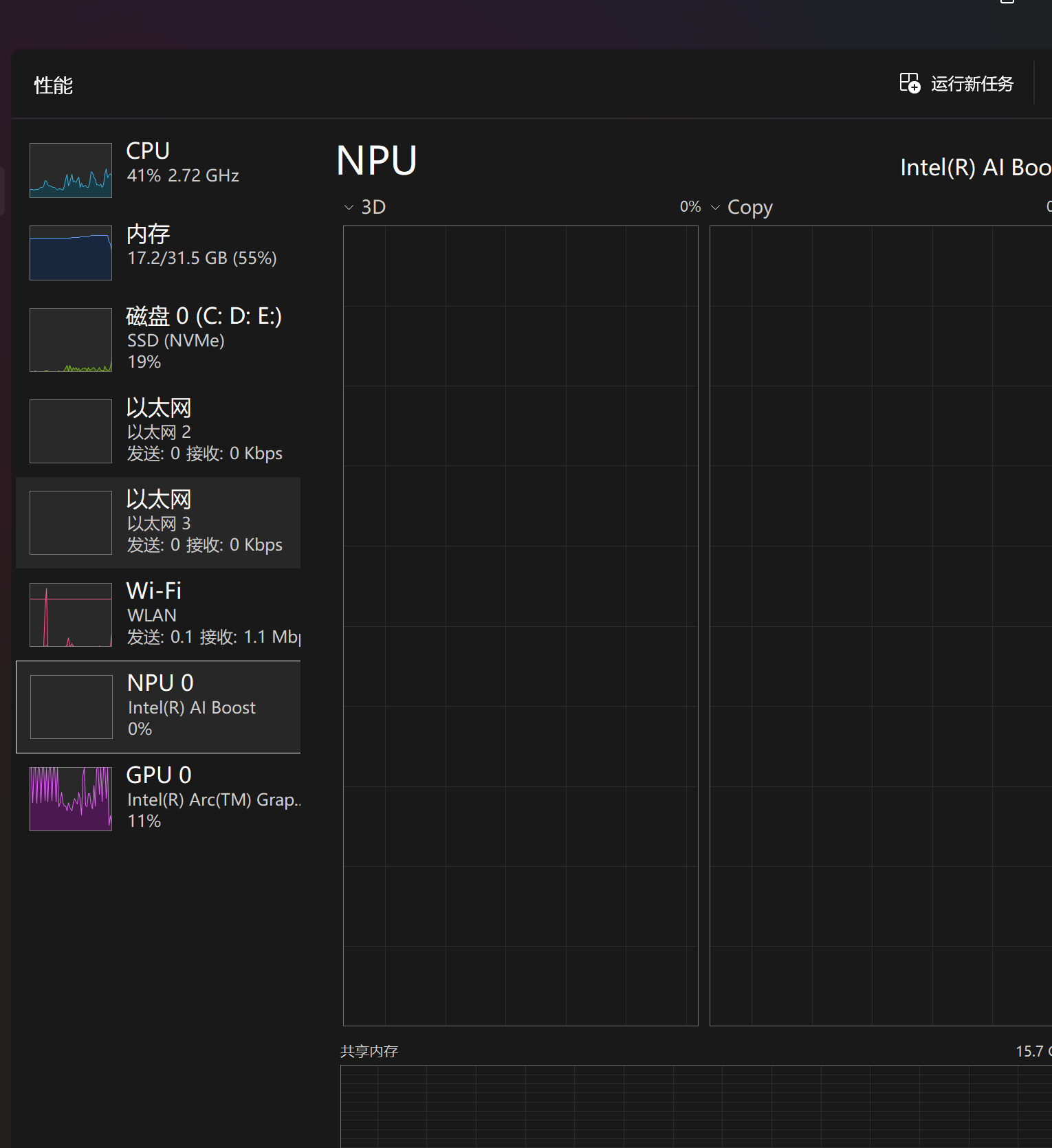
100多张,YOLOv11m模型的训练速度

附带我train.py的训练代码
import os
import time
from ultralytics import YOLO
from multiprocessing import freeze_support


def main():
    max_attempts = 5
    for attempt in range(max_attempts):
        try:
            # 检查是否有之前的断点
            if attempt > 0 and os.path.exists('runs/detect/train/weights/last.pt'):
                model = YOLO('runs/detect/train/weights/last.pt')
                print(f"从第 {attempt + 1} 次尝试恢复训练...")
            else:
                model = YOLO(r'D:\ultralytics-8.3.115YOLOv11\ultralytics-8.3.115\ultralytics\cfg\models\11\yolo11m.yaml')  # 或其他模型

            model.train(
                data=r'D:\ultralytics-8.3.115YOLOv11\ultralytics-8.3.115\ultralytics\cfg\datasets\typhoon.yaml',
                device='xpu',
                epochs=60,
                batch=4,    # 降低batch以减少内存压力
                imgsz=640,  # 减小图像尺寸
                workers=0,  # Windows上必须为0
                amp=False,  # 禁用混合精度
                # 其他参数...
            )
            break  # 训练成功完成,退出循环
        except Exception as e:
            print(f"训练尝试 {attempt + 1} 失败: {e}")
            if attempt < max_attempts - 1:
                print("等待60秒后重试...")
                time.sleep(60)  # 等待一段时间,让XPU恢复
            else:
                print("达到最大重试次数,训练终止")


if __name__ == '__main__':
    freeze_support()
    main()
这里面要对一下文件路径进行更改。
问题
很多人在跟随大佬教程做完后会碰到
ValueError: Invalid CUDA 'device=xpu:0' requested. Use 'device=cpu' or pass valid CUDA device(s) if available, i.e. 'device=0' or 'device=0,1,2,3' for Multi-GPU. torch.cuda.is_available(): False torch.cuda.device_count(): 0 os.environ['CUDA_VISIBLE_DEVICES']: None See Get Started for up-to-date torch install instructions if no CUDA devices are seen by torch.
类似于这种错误,这是因为尝试使用 XPU 设备进行训练,但 PyTorch 没有检测到可用的 CUDA 设备
解决办法
如果你使用的是 Intel GPU(而非 NVIDIA),需要安装特殊版本的 PyTorch:
# 安装Intel XPU优化的
pip install --pre torch torchvision torchaudio --index-url https://download.pytorch.org/whl/nightly/xpu也有可能会碰到
AssertionError: Torch not compiled with CUDA enabled的错误,这是因为你的 PyTorch 版本是 CPU 版本,不支持 CUDA GPU 加速,但代码尝试使用 GPU 进行训练。
首先进入环境中进行一下测试,看看你的PyTorch的XPU版本有没有安装好
import torch

print(f"PyTorch版本: {torch.__version__}")
print(f"XPU可用: {torch.xpu.is_available()}")
print(f"XPU设备数量: {torch.xpu.device_count()}")

if torch.xpu.is_available():
    print(f"XPU设备名称: {torch.xpu.get_device_name(0)}")
else:
    print("XPU不可用,请检查驱动和安装")
还要确保安装了最新的英特尔显卡驱动。
测试成功会输出这样的结果
XPU可用: True XPU
设备名称: Intel(R) Arc(TM) Graphics XPU
内存: 14.35 GB
接下来要修改 Ultralytics 源码以跳过 CUDA 检查
- 找到
ultralytics/utils/checks.py文件(错误堆栈中显示的路径) - 定位到
check_amp()函数(约第 730 行) - 修改代码如下:
# 原代码(报错行)
# gpu = torch.cuda.get_device_name(device)

# 修改为
gpu = torch.xpu.get_device_name(0) if torch.xpu.is_available() else "CPU"并且在你的训练代码中,强制使用 XPU 并禁用 CUDA,在训练代码中添加环境变量,完全禁用 CUDA 检测
import os
os.environ['CUDA_VISIBLE_DEVICES'] = '-1'  # 禁用CUDA
os.environ['FORCE_CUDA'] = '0'  # 强制不使用CUDA

from ultralytics import YOLO

# 创建模型并指定XPU
model = YOLO('yolov8n.pt').to('xpu')

# 训练(明确指定device='xpu')
model.train(
    data=r'D:\ultralytics-8.3.115YOLOv11\ultralytics\cfg\datasets\typhoon.yaml',
    device='xpu',
    amp=False,  # 暂时禁用混合精度训练(XPU支持可能不完善)
    # 其他参数...
)
要对文件路径进行更改
更新 Ultralytics 到最新版本
某些版本的 Ultralytics 可能不兼容 XPU,尝试更新到最新版本:
pip install --upgrade git+https://github.com/ultralytics/ultralytics.git做完这些后就可能碰到
ValueError: Invalid CUDA 'device=xpu' requested. Use 'device=cpu' or pass valid CUDA device(s) if available, i.e. 'device=0' or 'device=0,1,2,3' for Multi-GPU. torch.cuda.is_available(): False torch.cuda.device_count(): 0 os.environ['CUDA_VISIBLE_DEVICES']: -1 See Get Started for up-to-date torch install instructions if no CUDA devices are seen by torch.
这个问题是因为Ultralytics 框架内部的设备选择逻辑仍然强制要求使用 CUDA 设备,即使你指定了device='xpu',这是因为 Ultralytics 目前主要针对 NVIDIA GPU 优化,对英特尔 XPU 的支持有限。
修改 Ultralytics 源码以支持 XPU
找到并修改ultralytics/utils/torch_utils.py文件中的select_device()函数:
# 原代码(约第190行)
if device.lower().startswith(('cuda', 'gpu', 'xpu')):  # 'cuda:0', 'gpu:0', 'xpu:0' etc.

# 修改为
if device.lower().startswith(('cuda', 'gpu')):  # 仅保留CUDA/GPU检查,移除XPU
完整的select_device()代码
def select_device(device="", batch=0, newline=False, verbose=True):
    """
    Select the appropriate PyTorch device based on the provided arguments.

    The function takes a string specifying the device or a torch.device object and returns a torch.device object
    representing the selected device. The function also validates the number of available devices and raises an
    exception if the requested device(s) are not available.

    Args:
        device (str | torch.device, optional): Device string or torch.device object.
            Options are 'None', 'cpu', or 'cuda', or '0' or '0,1,2,3'. Defaults to an empty string, which auto-selects
            the first available GPU, or CPU if no GPU is available.
        batch (int, optional): Batch size being used in your model. Defaults to 0.
        newline (bool, optional): If True, adds a newline at the end of the log string. Defaults to False.
        verbose (bool, optional): If True, logs the device information. Defaults to True.

    Returns:
        (torch.device): Selected device.

    Raises:
        ValueError: If the specified device is not available or if the batch size is not a multiple of the number of
            devices when using multiple GPUs.

    Examples:
        >>> select_device("cuda:0")
        device(type='cuda', index=0)

        >>> select_device("cpu")
        device(type='cpu')

    Note:
        Sets the 'CUDA_VISIBLE_DEVICES' environment variable for specifying which GPUs to use.
    """
    if isinstance(device, torch.device) or str(device).startswith("tpu"):
        return device

    # 新增:检查XPU设备
    xpu = False
    if str(device).lower().startswith("xpu"):
        xpu = True
        if not torch.xpu.is_available():
            raise ValueError(f"Invalid XPU 'device={device}' requested. XPU is not available.")
        device = "xpu:0"  # 规范化XPU设备格式

    s = f"Ultralytics {__version__} 🚀 Python-{PYTHON_VERSION} torch-{torch.__version__} "
    device = str(device).lower()
    for remove in "cuda:", "none", "(", ")", "[", "]", "'", " ":
        device = device.replace(remove, "")  # to string, 'cuda:0' -> '0' and '(0, 1)' -> '0,1'
    cpu = device == "cpu"
    mps = device in {"mps", "mps:0"}  # Apple Metal Performance Shaders (MPS)
    if cpu or mps or xpu:  # 修改:添加xpu
        os.environ["CUDA_VISIBLE_DEVICES"] = "-1"  # force torch.cuda.is_available() = False
    elif device:  # non-cpu device requested
        if device == "cuda":
            device = "0"
        if "," in device:
            device = ",".join([x for x in device.split(",") if x])  # remove sequential commas, i.e. "0,,1" -> "0,1"
        visible = os.environ.get("CUDA_VISIBLE_DEVICES", None)
        os.environ["CUDA_VISIBLE_DEVICES"] = device  # set environment variable - must be before assert is_available()
        if not (torch.cuda.is_available() and torch.cuda.device_count() >= len(device.split(","))):
            LOGGER.info(s)
            install = (
                "See https://pytorch.org/get-started/locally/ for up-to-date torch install instructions if no "
                "CUDA devices are seen by torch.\n"
                if torch.cuda.device_count() == 0
                else ""
            )
            raise ValueError(
                f"Invalid CUDA 'device={device}' requested."
                f" Use 'device=cpu' or pass valid CUDA device(s) if available,"
                f" i.e. 'device=0' or 'device=0,1,2,3' for Multi-GPU.\n"
                f"\ntorch.cuda.is_available(): {torch.cuda.is_available()}"
                f"\ntorch.cuda.device_count(): {torch.cuda.device_count()}"
                f"\nos.environ['CUDA_VISIBLE_DEVICES']: {visible}\n"
                f"{install}"
            )

    if xpu:  # 新增:XPU设备信息
        s += f"XPU ({torch.xpu.get_device_name(0)})\n"
        arg = "xpu:0"
    elif not cpu and not mps and torch.cuda.is_available():  # prefer GPU if available
        devices = device.split(",") if device else "0"  # i.e. "0,1" -> ["0", "1"]
        n = len(devices)  # device count
        if n > 1:  # multi-GPU
            if batch < 1:
                raise ValueError(
                    "AutoBatch with batch<1 not supported for Multi-GPU training, "
                    "please specify a valid batch size, i.e. batch=16."
                )
            if batch >= 0 and batch % n != 0:  # check batch_size is divisible by device_count
                raise ValueError(
                    f"'batch={batch}' must be a multiple of GPU count {n}. Try 'batch={batch // n * n}' or "
                    f"'batch={batch // n * n + n}', the nearest batch sizes evenly divisible by {n}."
                )
        space = " " * (len(s) + 1)
        for i, d in enumerate(devices):
            s += f"{'' if i == 0 else space}CUDA:{d} ({get_gpu_info(i)})\n"  # bytes to MB
        arg = "cuda:0"
    elif mps and TORCH_2_0 and torch.backends.mps.is_available():
        # Prefer MPS if available
        s += f"MPS ({get_cpu_info()})\n"
        arg = "mps"
    else:  # revert to CPU
        s += f"CPU ({get_cpu_info()})\n"
        arg = "cpu"

    if arg in {"cpu", "mps"}:
        torch.set_num_threads(NUM_THREADS)  # reset OMP_NUM_THREADS for cpu training
    if verbose:
        LOGGER.info(s if newline else s.rstrip())
    return torch.device(arg)
同时,在函数开头添加 XPU 检查逻辑
def select_device(device='', batch_size=0, newline=True):
    # 添加XPU检查
    xpu = False
    if device.lower().startswith('xpu'):
        xpu = True
        if not torch.xpu.is_available():
            raise ValueError(f"Invalid XPU 'device={device}' requested. XPU is not available.")
        device = 'xpu:0'  # 规范化XPU设备格式

    # 原函数剩余部分...
    cuda = False
    if device.lower().startswith(('cuda', 'gpu')):  # 'cuda:0', 'gpu:0' etc.
        # 原CUDA检查逻辑...
在你的训练脚本中添加自定义设备选择函数,绕过 Ultralytics 的检查:
import torch
from ultralytics import YOLO

def select_xpu_device(device_str):
    if device_str.lower() == 'xpu' and torch.xpu.is_available():
        return torch.device('xpu:0')
    elif device_str.lower() == 'cpu':
        return torch.device('cpu')
    else:
        raise ValueError(f"Unsupported device: {device_str}. Use 'xpu' or 'cpu'.")

# 创建模型并手动指定设备
device = select_xpu_device('xpu')
model = YOLO('yolov8n.pt').to(device)

# 训练(不再通过train()参数指定device)
model.train(
    data=r'D:\ultralytics-8.3.115YOLOv11\ultralytics\cfg\datasets\typhoon.yaml',
    # 不指定device参数,因为已手动设置
    amp=False,  # 禁用混合精度训练
    # 其他参数...
)
在脚本开头添加环境变量,尝试覆盖框架的设备检测逻辑:
import os
os.environ['CUDA_VISIBLE_DEVICES'] = '-1'  # 禁用CUDA
os.environ['TORCH_DEVICE'] = 'xpu'  # 强制使用XPU
os.environ['ULTRALYTICS_DEVICE'] = 'xpu'  # 自定义环境变量(如果框架支持)

from ultralytics import YOLO

# 创建模型并训练
model = YOLO('yolov8n.pt')
model.train(
    data=r'D:\ultralytics-8.3.115YOLOv11\ultralytics\cfg\datasets\typhoon.yaml',
    device='xpu',
    # 其他参数...
)
这些做完后一般就可以进行训练了,在训练的时候可能碰到训练一两轮就停止的情况,这是因为这个错误是由于在 Windows 系统上使用多进程数据加载时,没有正确保护主模块导致的。Windows 上,Python 的多进程库multiprocessing使用spawn方法创建新进程,这要求主模块代码必须被if __name__ == '__main__':保护,底下是修改代码的示例:
from ultralytics import YOLO

def main():
    # 创建模型并训练
    model = YOLO('yolov8n.pt')  # 使用预训练模型

    # 训练模型
    model.train(
        data=r'D:\ultralytics-8.3.115YOLOv11\ultralytics\cfg\datasets\typhoon.yaml',
        device='xpu',      # 使用XPU设备
        epochs=100,        # 训练轮次
        imgsz=640,         # 输入图像大小
        amp=False,         # 禁用混合精度训练
        workers=0,         # 设置为0以避免多进程问题
        # 其他参数...
    )

if __name__ == '__main__':
    main()
也有可能会训练几轮就报这个错误AssertionError: Torch not compiled with CUDA enabled
原因是代码尝试查询 CUDA 内存信息,但当前环境中 PyTorch 没有启用 CUDA 支持,因为我们之前禁用了 CUDA 以强制使用 XPU,但 Ultralytics 框架仍然尝试访问 CUDA 相关函数。
修改源代码
- 找到并打开
ultralytics/engine/trainer.py文件 - 定位到
_get_memory()方法(大约在第 500 行左右) - 修改该方法,使其在使用 XPU 时返回 0 或其他合适的值
修改后的代码
def _get_memory(self, fraction=False):
    """Get total available memory or memory fraction on the training device."""
    if self.device.type == 'cpu':
        return 0  # CPU has no GPU memory constraints
    elif self.device.type == 'xpu':
        # XPU设备不支持torch.cuda相关调用,返回0或估计值
        return 0
    else:  # CUDA
        if not torch.cuda.is_available():
            return 0
        total = torch.cuda.get_device_properties(self.device).total_memory
        if fraction:
            return torch.cuda.memory_reserved(self.device) / total
        else:
            return torch.cuda.memory_reserved(self.device) / 1024 ** 3  # GiB
所有问题基本都说完啦,希望大家也可以愉快的使用英特尔的GPU在轻薄本上进行YOLO训练。

葡萄城是专业的软件开发技术和低代码平台提供商,聚焦软件开发技术,以“赋能开发者”为使命,致力于通过表格控件、低代码和BI等各类软件开发工具和服务,一站式满足开发者需求,帮助企业提升开发效率并创新开发模式。
更多推荐

 28
28 0
0- 0


 已为社区贡献1条内容

所有评论(0)