Codex 作为平台:基于开放智能体框架进行构建 Codex as a platform: build on the open agent harness
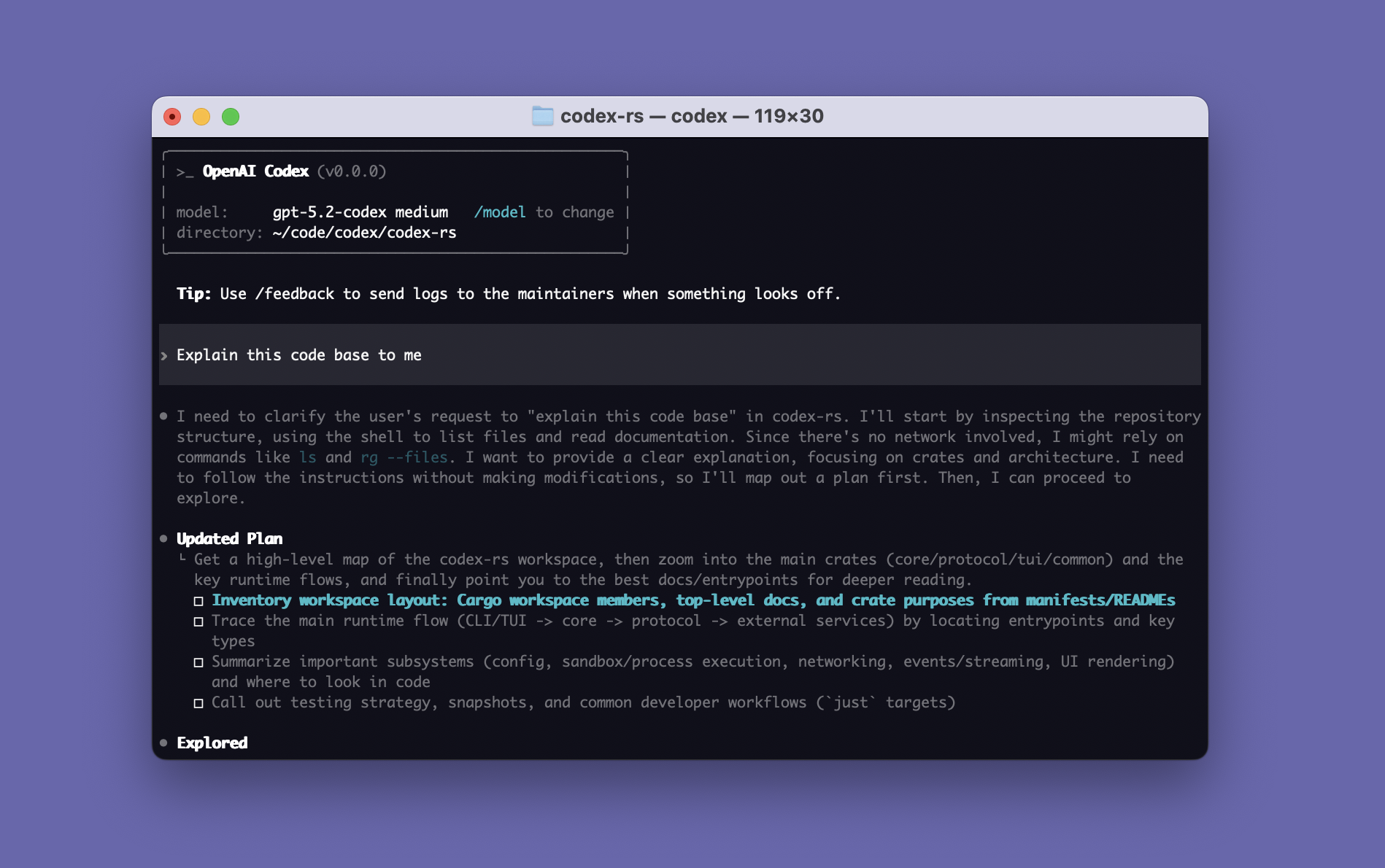
大多数人通过 App、命令行界面或 IDE 扩展认识 Codex。这些体验固然重要,但它们只是同一底层系统的少数几种使用方式。
开源的 Codex harness 正是支撑所有这些体验的核心。它帮助模型收集上下文、推理任务、使用工具、在配置的边界内运行、请求审批,并持续推进工作。
这改变了开发者能够构建的内容。与其要求每个团队都把工作迁移到一个通用编程助手中,不如把智能体带入围绕实际任务设计的软件中:工程工作流、运维仪表盘、安全调查、客户支持控制台,或为某个专业团队构建的内部应用。
可复用的部分是智能体循环
一个合格的智能体远不止提示词加模型响应。它需要能够理解任务、随时间维护上下文、检查相关信息、调用工具、展示进度、处理失败、在必要时请求人工审批,并返回有用的结果。
这套外围执行系统就是 harness。
Harness 的设计能显著改变结果:在 ARC-AGI-3 上,保留推理和上下文压缩将 GPT-5.6 Sol 的得分从 13.3% 提升到 38.3%,同时将输出 token 减少了六倍。
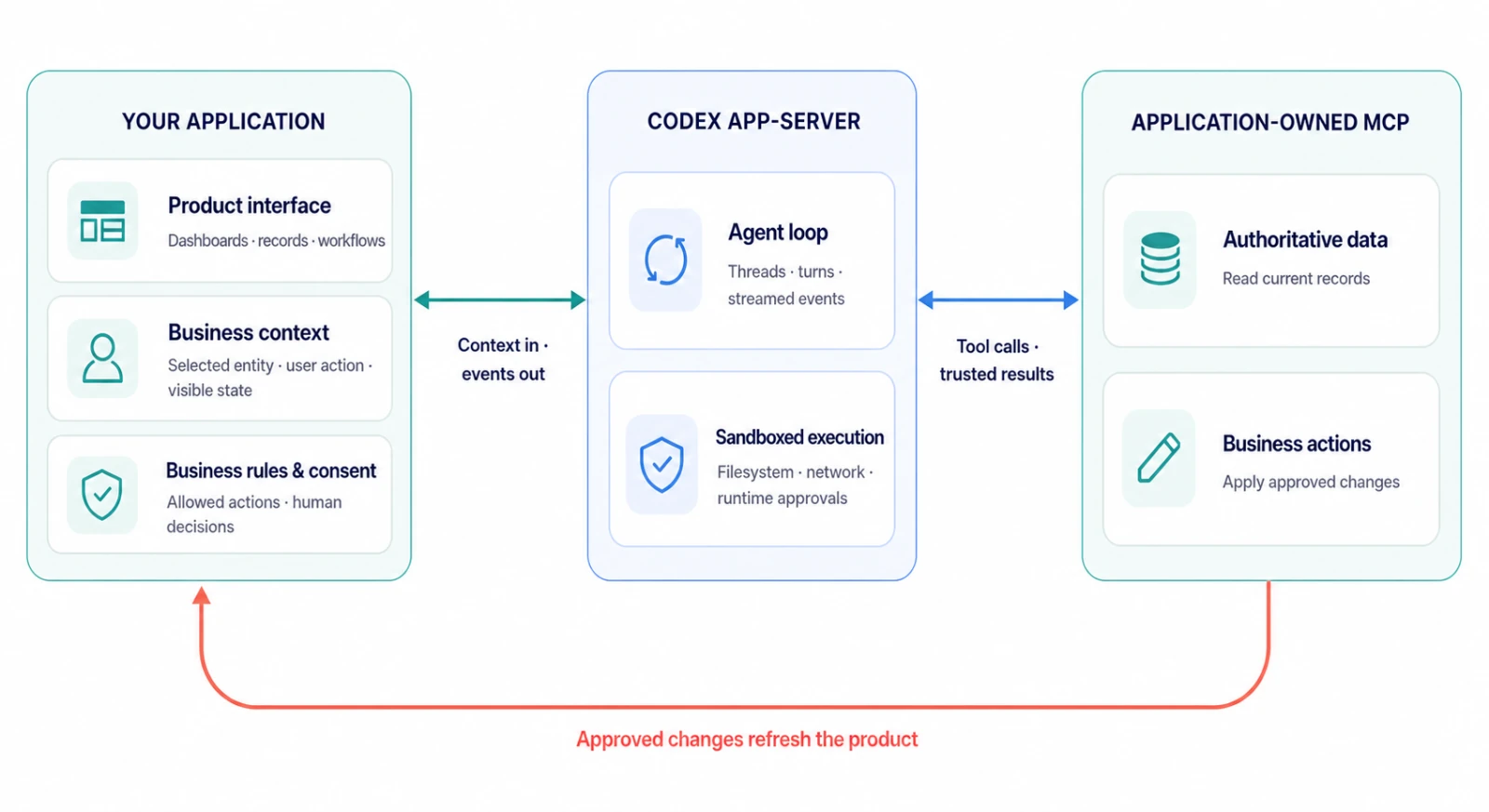
我们构建 Codex harness 是为了管理对话状态、流式执行、使用工具、执行配置的沙箱和审批策略,并跨轮次推进工作。借助 Codex app-server,我们通过文档化的客户端协议开放这些能力:应用可以创建线程、启动轮次、接收事件并处理审批请求。
如果你正在构建需要智能体的软件,可以直接从 Codex 起步,而不必自研新的运行时,然后再决定外围应用应该负责什么。
https://developers.openai.com/blog/codex-as-a-platform
Most people know Codex through the App, Command-Line Interface, or IDE Extension. Those experiences are important, but they are only a few of the ways the same underlying system can be used.
The open-source Codex harness is what powers all these experiences. It helps models gather context, reason through tasks, use tools, operate within configured boundaries, request approval, and carry work forward.
That changes what developers can build. Instead of asking every team to move its work into a general-purpose coding assistant, you can bring the agent into software designed around the actual job: an engineering workflow, an operations dashboard, a security investigation, a customer-support console, or an internal application built for one specialized team.
The reusable part is the agent loop
A capable agent is more than a prompt and a model response. It needs a way to understand a task, maintain context over time, inspect relevant information, call tools, expose progress, handle failures, request human approval when necessary, and return a useful result.
That surrounding execution system is the harness.
Harness design can materially change results: on ARC-AGI-3, retained reasoning and context compaction raised GPT-5.6 Sol’s score from 13.3% to 38.3% while reducing output tokens sixfold.
We built the Codex harness to manage conversation state, stream execution, use tools, enforce configured sandbox and approval policies, and carry work across turns. With Codex app-server, we expose those capabilities through a documented client protocol: applications can create threads, start turns, receive events, and handle approval requests.
If you are building software that needs an agent, you can start with Codex instead of inventing a new runtime, then decide what the surrounding application should own.
一个可检查、可调整的开放 harness
由于 harness 是开源的,你可以检查应用与模型之间的这一层,理解它的行为方式,并调整集成方案以适配你的产品。
这让开发者能够掌控那些让智能体契合其产品的关键部分:
-
界面。团队可以保留现有的仪表盘、编辑器、队列、地图、记录和审批流程,而不必把每一次交互都塞进一个通用的聊天窗口。
-
上下文与工具。应用可以暴露对特定工作流至关重要的系统、文档、数据和操作,包括应用自有的 MCP 服务。
-
运行边界。宿主应用可以决定智能体在哪里运行、可以访问哪些文件或工具、哪些操作需要审批、工作如何被观察,以及结果如何返回给记录系统。
我们将 Codex CLI、app-server 和 官方 Codex SDK 作为开源组件发布。我们的 开源组件指南 列出了可用的组件及其所在位置。
开源层就是 harness 和集成面;模型访问和托管服务保持独立。
选择合适的集成层
基于 Codex 构建,并不要求每个用例都采用相同的集成方式。
-
对于脚本、CI 任务或一次性的后台任务,codex exec 可以运行一个有边界的智能体工作流并返回结构化输出。
-
对于需要启动、恢复或流式处理 Codex 任务的应用代码,官方 Codex SDK 提供了直接的编程接口。
可运行的示例请参阅 Codex SDK 文档。
当智能体本身就是产品的一部分时,请使用 Codex app-server。它让你的应用能够连接到本地 Codex 进程、保持对话开启、流式接收事件、中断工作、暴露工具并响应审批请求。SDK 简化了常见的编程工作流;app-server 则让产品团队对生命周期和用户体验拥有直接控制权。
围绕工作流构建软件
最有趣的机会不在于换一个 Logo 去复刻 Codex 应用,而在于构建能反映某个具体个人或团队现有工作方式的软件:
安全分析师可能需要一个调查队列、最近的告警、受影响的服务,以及在开启修复工单之前的审批步骤。支持工程师可能需要账户历史、产品日志、内部文档和一份草拟的回复。产品团队可能想要一个任务看板,把某个问题拖入就绪状态即可启动一个有范围的实施工作流。
在每一个例子中,界面都是体验的重要组成部分。它告诉智能体用户正在看什么,为它提供合适的工具,并给用户一个地方来审阅接下来会发生什么。
An open harness developers can inspect and adapt
Because the harness is open source, you can inspect the layer between your application and the model, understand how it behaves, and adapt the integration to fit your product.
That gives developers control over the parts that make the agent fit their product:
-
The interface. A team can keep its existing dashboards, editors, queues, maps, records, and approval flows instead of forcing every interaction into a generic chat window.
-
Context and tools. An application can expose the systems, documents, data, and actions that matter for a particular workflow, including application-owned MCP services.
-
Operational boundaries. The host application can decide where an agent runs, which files or tools it can access, which actions require approval, how work is observed, and how results return to the system of record.
We publish the Codex CLI, app-server, and official Codex SDK as open-source components. Our open-source components guide lists what is available and where each component lives.
The open-source layer is the harness and integration surface; model access and managed services remain separate.
Choose the right integration layer
Building on Codex does not require the same integration for every use case.
-
For a script, CI job, or one-off background task, codex exec can run a bounded agent workflow and return structured output.
-
For application code that needs to start, resume, or stream Codex tasks, the official Codex SDK provides a direct programmatic interface.
For a runnable example, see the Codex SDK documentation.
Use Codex app-server when the agent is part of the product itself. It lets your application connect to a local Codex process, keep conversations open, stream events, interrupt work, expose tools, and respond to approval requests. The SDK simplifies common programmatic workflows; app-server gives product teams direct control over the lifecycle and user experience.
Build software around the workflow
The most interesting opportunity is not to reproduce the Codex app with a different logo, but to build software that reflects how a specific person or team already works:
A security analyst might need an investigation queue, recent alerts, affected services, and an approval step before opening a remediation ticket. A support engineer might need account history, product logs, internal documentation, and a draft response. A product team might want a task board where moving an issue into a ready state begins a scoped implementation workflow.
In each example, the interface is an important part of the experience. It tells the agent what the user is looking at, gives it the right tools, and gives the user a place to review what happens next.
示例:Relay
我们在 Codex app-server 上构建了 Relay,作为一个示例运维应用。它在虚构的发货仪表盘旁放置一个智能体,将其连接到应用自有的 MCP 工具,并在重新预订发货之前要求人工审批。
用户并非从零开始编写提示词。他们选择一批货物,然后点击诸如比较恢复方案之类的操作。应用提供相关上下文,Codex 检索最新的示例运营数据,智能体解释可用选项,任何重要的写入操作都需要审批。
随后,Codex 可以使用应用的 MCP 工具获取最新数据,再推荐——或在审批通过后执行——某项操作。当某个工具改变了底层记录时,应用会刷新其业务视图。harness 负责处理智能体循环、对话状态、流式活动和工具交互;产品则继续拥有自己的仪表盘、记录和控件。
Relay 使用虚构的种子数据,但这一集成模式具有通用性。同样的模式可以支撑事件响应、账户运营、研究工作流,或其他需要智能体在现有产品体验内部工作的应用。
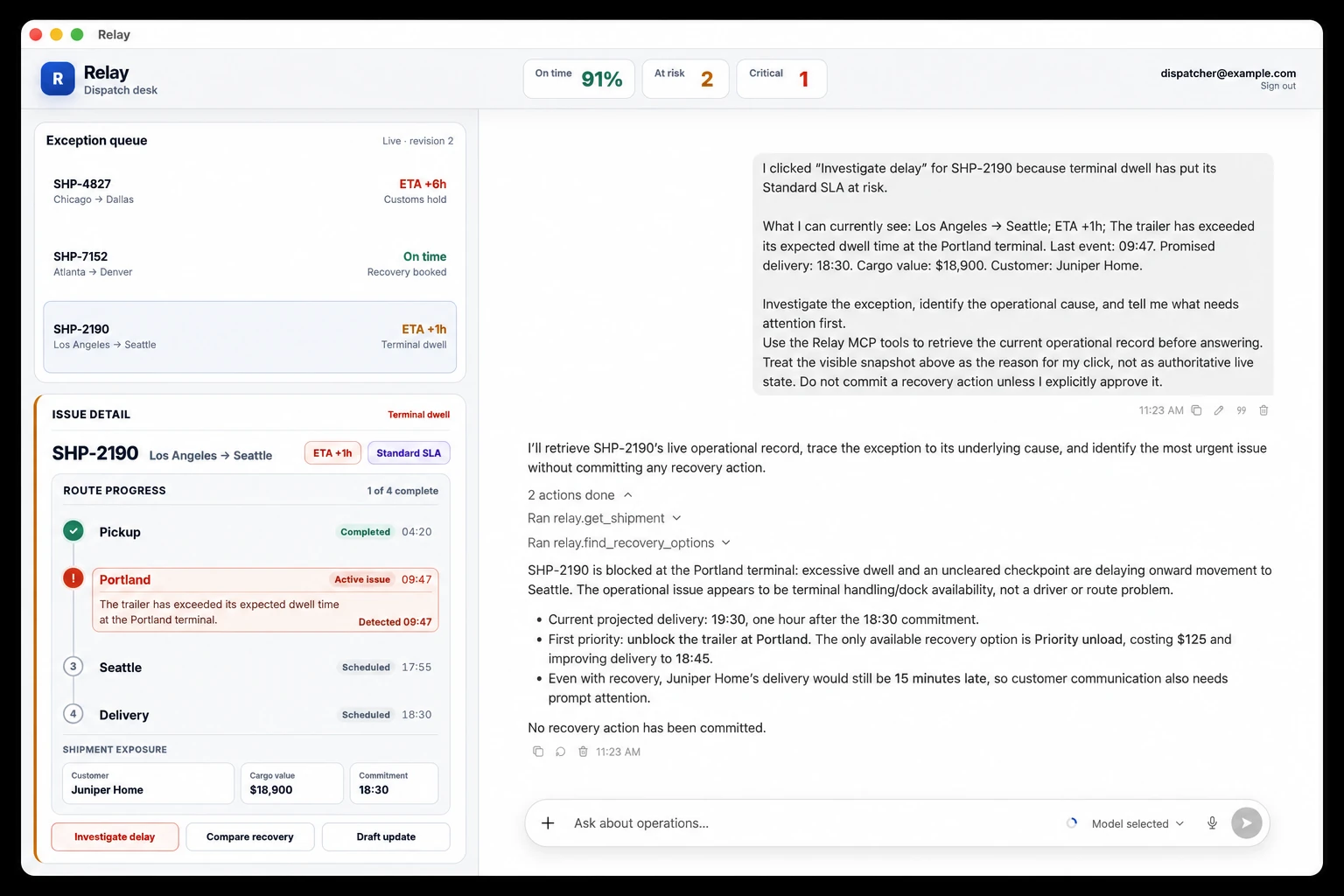
Example: Relay
We built Relay as a sample operations application on Codex app-server. It places an agent beside a fictional shipment dashboard, connects it to application-owned MCP tools, and requires human approval before a shipment is rebooked.
The user does not start by writing a prompt from scratch. They select a shipment and click an action such as Compare recovery. The application supplies the relevant context, Codex retrieves the latest sample operational data, the agent explains the available options, and any consequential write requires approval.
Codex can then use the application’s MCP tools to fetch current data before recommending—or, after approval, taking—an action. When a tool changes the underlying record, the application refreshes its business view. The harness handles the agent loop, conversation state, streamed activity, and tool interaction; the product continues to own its dashboard, records, and controls.
Relay uses fictional seeded data, but the integration pattern is general. The same pattern could power incident response, account operations, research workflows, or other applications where an agent should work inside an existing product experience.
---
GitHub - openai/codex: Lightweight coding agent that runs in your terminal · GitHub
葡萄城是专业的软件开发技术和低代码平台提供商,聚焦软件开发技术,以“赋能开发者”为使命,致力于通过表格控件、低代码和BI等各类软件开发工具和服务,一站式满足开发者需求,帮助企业提升开发效率并创新开发模式。
更多推荐
 8
8 0
0- 0


 已为社区贡献1条内容

所有评论(0)